Creative ways of using DataTale SMART RAID Systems
Our DataTale SMART 4-Bay RAID System (RC-M4QJ) is the ultimate multi-task and backup RAID System for all users! Its intelligent design makes communicating with separate entities as quickly as snapping your fingers, and enjoying digital entertainment easy during spare time! The DataTale SMART is created with a user-friendly yet robust GUI, the RAID MASTER, which provides all types of customized RAID settings. In addition, a LCM display is installed for instant monitoring or basic RAID changes; and quad-interface ports (USB 2.0/eSATA/EEE 1394a/EEE1394b) are included for direct connection on the spot anytime or anywhere!
Due to its special capabilities, the DataTale SMART can be utilized in many different ways! Those methods may include:
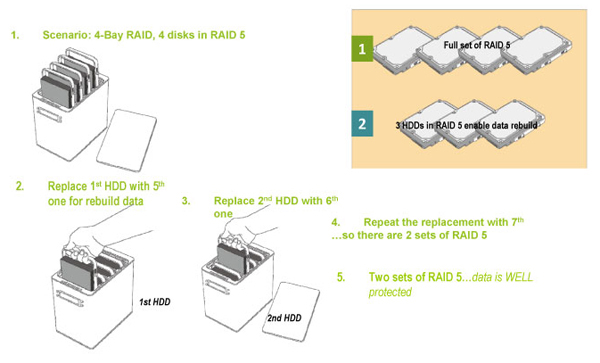
Utmost Data Backup: Use 7 hard drives to achieve the maximum level of backup with security while doubling on protection assurance. Simply backup 4 of the hard drives under RAID 5, and then rebuild each hard drive's original data by replacing it with a new hard drive one by one until a new set of duplicated RAID 5 data hard drives is created!
Due to its special capabilities, the DataTale SMART can be utilized in many different ways! Those methods may include:
Utmost Data Backup: Use 7 hard drives to achieve the maximum level of backup with security while doubling on protection assurance. Simply backup 4 of the hard drives under RAID 5, and then rebuild each hard drive's original data by replacing it with a new hard drive one by one until a new set of duplicated RAID 5 data hard drives is created!