My computer does not recognize the DataWhale. What should I do?
For eSATA/USB 2.0 models (RS-M2TS, RS-M2TS-E), you must press the Reset button on first use. Due to the chipset, after deleting the current partition and setting up a new RAID mode, the Reset button on the right hand side of the Mode Switch must be pressed for the updated RAID mode to work.
Pressing the Reset button for at least 3 ~ 5 seconds is highly recommended.Pressing the Reset button for at least 3 ~ 5 seconds is recommended.
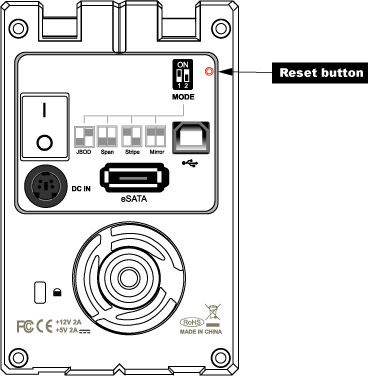
Pressing the Reset button for at least 3 ~ 5 seconds is highly recommended.Pressing the Reset button for at least 3 ~ 5 seconds is recommended.