My MacBook Pro always crashes whenever I connect my external eSATA device to the eSATA host card. My MAC OS is 10.6.8. Does the driver need to be updated for the eSATA host card?
Yes. The eSATA host card requires both a new firmware and new driver for MAC OS 10.5, 10.6, and 10.7.
Please complete the following steps to update for the eSATA host card.
1. First, download the FIRMWARE.
Note: The firmware update must be completed under Windows OS.
a. Right click on "MyComputer", and select "property"
b. Go to the "Hardware" tab, and click on "Device Manager"
c. Find the "storage controller" and choose SI3132
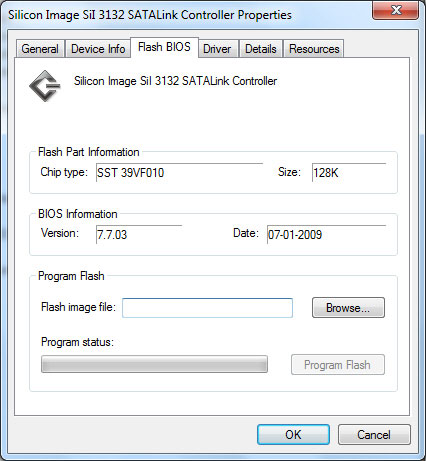
d. Go to "Flash BIOS" tab, and click on "Browse"
e. If the firmware version is not already "7703", please update the firmware. The firmware file should be called "b7703.bin"
f. Click on "Program Flash".
g. Restart the computer if your eSATA host card is PCI card; or re-plug the eSATA ExpressCard/34.
2. Then, download the DRIVER and update the Driver to the eSATA host card.
Please complete the following steps to update for the eSATA host card.
1. First, download the FIRMWARE.
Note: The firmware update must be completed under Windows OS.
a. Right click on "MyComputer", and select "property"
b. Go to the "Hardware" tab, and click on "Device Manager"
c. Find the "storage controller" and choose SI3132
d. Go to "Flash BIOS" tab, and click on "Browse"
e. If the firmware version is not already "7703", please update the firmware. The firmware file should be called "b7703.bin"
f. Click on "Program Flash".
g. Restart the computer if your eSATA host card is PCI card; or re-plug the eSATA ExpressCard/34.
2. Then, download the DRIVER and update the Driver to the eSATA host card.